BioGuide
   

BioGuide Project


Presentation
Publications


Acknowledgements

Use BioGuideSRS


Use BioGuide


Restricted area

User documentation


Querying process
Preferences
Menus
Configuration file


Example

Technical


documentation


Instructions


Querying process - Step 2 (advanced)

This step is only used for BioGuideSRS (jump to Step 3 for default mode)
A keyword search is possible:

Keyword search for an entity
   
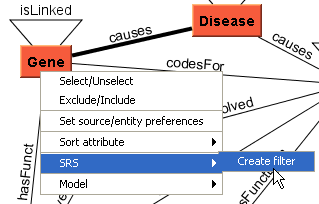
  Adding a SRS filter for an entity means that this keyword will have to be found in all the sources in the result path that are related to this entity (unless a more specific filter has been set for one of the related sources, cf. Keyword search for a given source)
 
  • To set a SRS filter for a given entity:
    1. Use the popup-menu for this entity (right click) and choose the sub-menu SRS/Create filter.
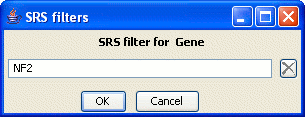
    2. Then in the new window, enter the filter value.
    Note. When a SRS filter is created the entity font color changes to yellow.
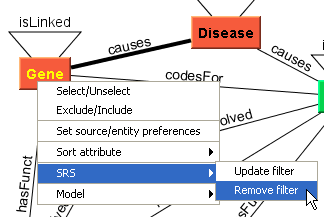
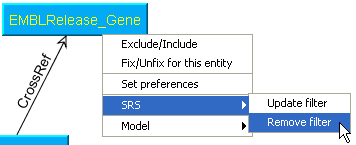
  • To update or remove a filter, use the same popup menu (as shown in screen capture 3).
Screen captures


Keyword search for a specific source
   
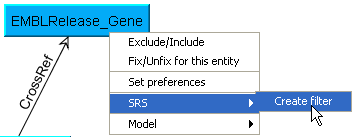
    Adding a SRS filter for a source means that this keyword will have to be found for this source if the source is used in the result path
  • To set a SRS filter for a given source:
    1. Use the popup-menu for this source (right click), and choose the sub-menu SRS/Create filter.
    2. In the new window: enter the filter value.
    Note: When a SRS filter is created the source-entity font color changes to yellow.
  • To update or remove a filter, use the same popup menu.

Screen captures


bioguide-project.net

Laboratoire de Recherche en Informatique, University of Pennsylvania

Contact us